▪ Two Free Custom Printer Profiles (worth $120) With Printer Purchase!
▪ Purchase an Epson P906 printer before August 30th and get up to $400 cashback!
Please note that we are open by appointment only (except for click and collect pickups once notified ready).
At Image Science, we get to play all day long with the best of the best, in terms of equipment - the best Eizo and BenQ monitors, hooked up to the best large format pigment ink printing machines, from Epson. World class artwork scanning machines. We're very lucky.
But even with those world class machines, tight colour management is critical to getting the absolute best accuracy and control out of those machines.
Perhaps counter-intuitively, excellent colour management is even more critical for getting the best results from more 'pedestrian' day-to-day machines. We like to regularly experiment with lower quality hardware - the sort of hardware that, realistically, many of our customers are using - to see what level of results we can get out of them.
Lately we've been getting more enquiries about EcoTank printers, and seeing more profile targets coming through for these machines.
The first thing to point out is that, as yet, there aren't any serious, fine-art level EcoTank machines. None of the EcoTank models - including the EcoTank Photo models - yet have archival pigment inks, so the prints produced are simply not archival/art-sale quality. And, none of the models released to date have the very high quality ink-sets that the Epson fine-art models have - there's no super smooth gradients, no high quality black and whites as the Advanced Black and White modes offer, and so on.
In general - if very high print quality, and archival prints for sale, are what you want to produce, look instead at the Epson fine-art inkjet range - currently, from most this means the Epson P706 and Epson P906 models. Those are the printers you will want if you're setting up a high quality small studio for professional graphic arts and/or photography work.
(Side note - At Image Science we don't sell the EcoTank range - for two main reasons - one, the printers aren't up to the quality level we need (and not being archival, simply aren't suitable for most of our clients' work) - and two, these units are sold through standard IT resellers and they don't have the appropriate level of warranty/support that we expect from professional machines and are thus comfortable selling).
Of course, the higher quality machines also come with higher running costs, and there are certainly some contexts where of course models like the current EcoTank models make sense.
For example, perhaps you want to produce greeting cards for sale? You probably don't need the absolute highest print quality, or the archival results, of the more expensive models for this. In this context lower running costs and ease of printing would be your primary concerns, because cards are a volume game.
And, of course, there's your day-to-day printing - recipes, kid's homework & school forms, quick photos for the pin-up board etc. An EcoTank model makes excellent sense for this sort of thing - and that's exactly the decision the Daalder family made recently. We purchased an EcoTank Photo ET-8500 - I'd have liked a bigger A3 model, but this printer lives in a cupboard so this was the best choice for us.
So what sort of results do these more humble machines offer, and what can we do to improve those results?
I was hopeful of a simple 'plug and print' experience. And for day to day printing, that was indeed the case. The printer was easy to set up and get going with for basic printing (as usual loaded with unnecessary blue plastic tape, though, sigh...).
Before long, though, I wanted to see how well it did with higher quality printing and papers.
Customers, usually beginners in the printing side of things, often tell me they don't need profiles (or good monitors) - as they get 'great' results out of the box. And it's true that the days of complete disasters are now behind us. As long as you choose sensible settings, you should get quite decent prints, and I found that to be the case.
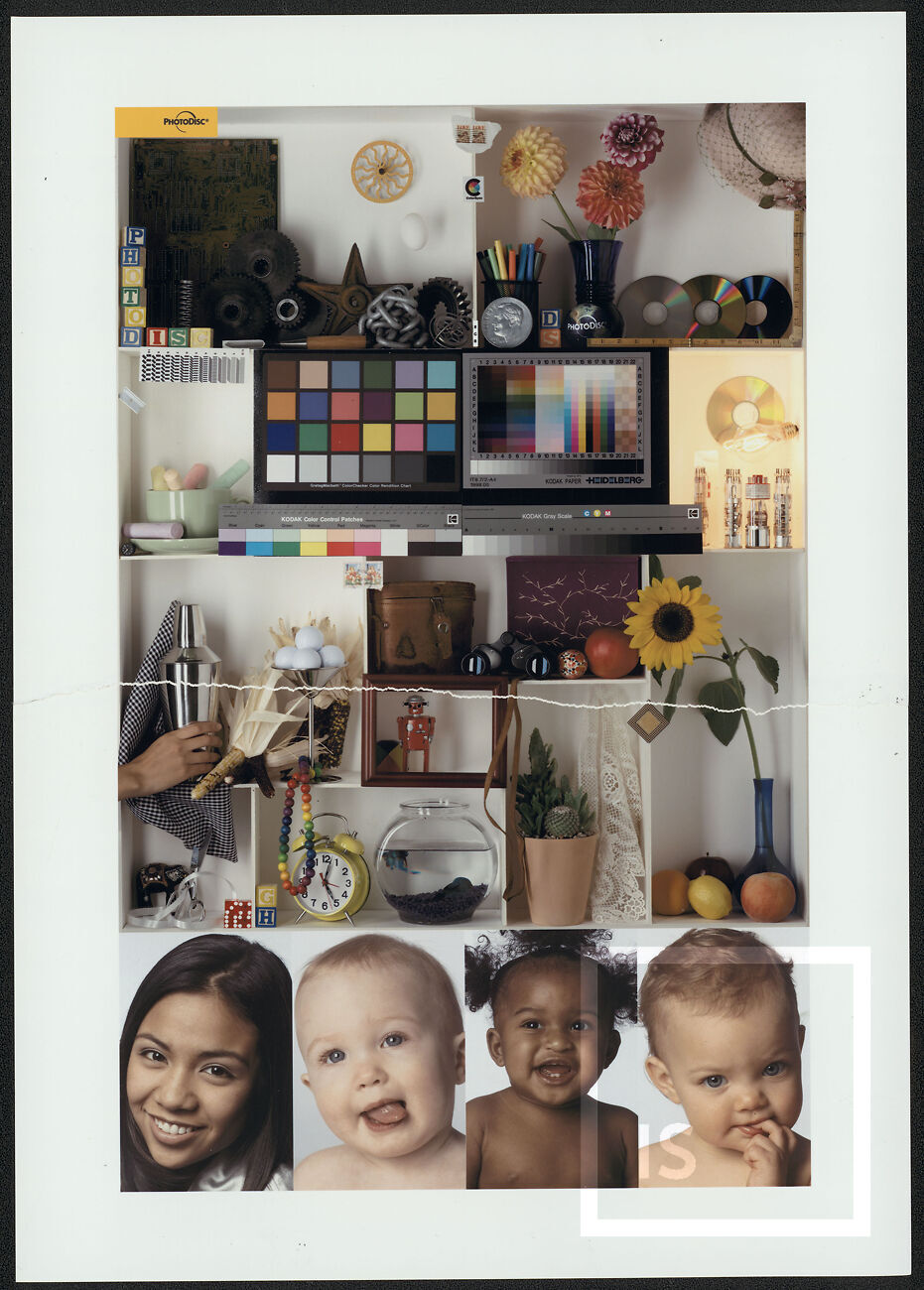
For easy comparisons, I used the PDI Printer Test image (which you can download from this link).
As a reminder, in its native digital form, it looks like this:
I decided to use Hahnemuehle Photo Rag 308 for the tests - the world's most popular fine art inkjet paper.
Here's a scan of the best print I could on Photo Rag make by just using appropriate settings in the Epson driver. Obviously this is not quite the same as looking at the actual print, but it gives a good idea, relative to the image above, of what you get 'out of the box' with this sort of printer.
Definitely not a disaster - better than I was expecting, I suppose. But still a long way off a good print. The colour as a whole is overly bright and washed out, there's a lack of solidity and contrast to the print.
It's simply not a good match, either to the numbers in the file, or to how a high quality, properly calibrated monitor displays this file.
I simply followed our custom profile service instructions to print my profile targets. These instructions were overhauled (by Blake, our services manager), early in 2024, and they proved very easy to follow.
I printed two profile targets for the papers I tend to use at home - Ilford Smooth Pearl (for quick family photo printing when I haven't the chance to do them properly at work) and the afore-mentioned Hahnemuehle Photo Rag which we use for all sorts of creative jobs.
We then made the profiles here at Image Science, and I installed them (as per our Using ICC Profile instructions).
Now, even though I've been profiling and printing professional for the better part of 3 decades at this point, I don't actually print out of Photoshop anymore (at work we use a RIP and at home I usually use Lightroom). Also, I can just be a bit stupid sometimes. So just to prove that point, here's the first print I made with the resulting ICC profile for Smooth Pearl.
OK, so that's a bit of a disaster.
That's what you get if you stupidly forget to tick the 'Black Point Compensation' box when making your print. Of course are instructions say to tick this box, and of course anyone who knows anything about this knows it's frankly ridiculous there even IS a box to tick - BPC should always, always be on when actually printing!
And yes, I tore the image in half in frustration before realising that it might be helpful to make the point that printer drivers and Photoshop are fiddly, and you really do need to pay attention to every aspect to get correct prints. If I can screw up, with decades of experience - anyone can. So don't feel bad if/when you do!
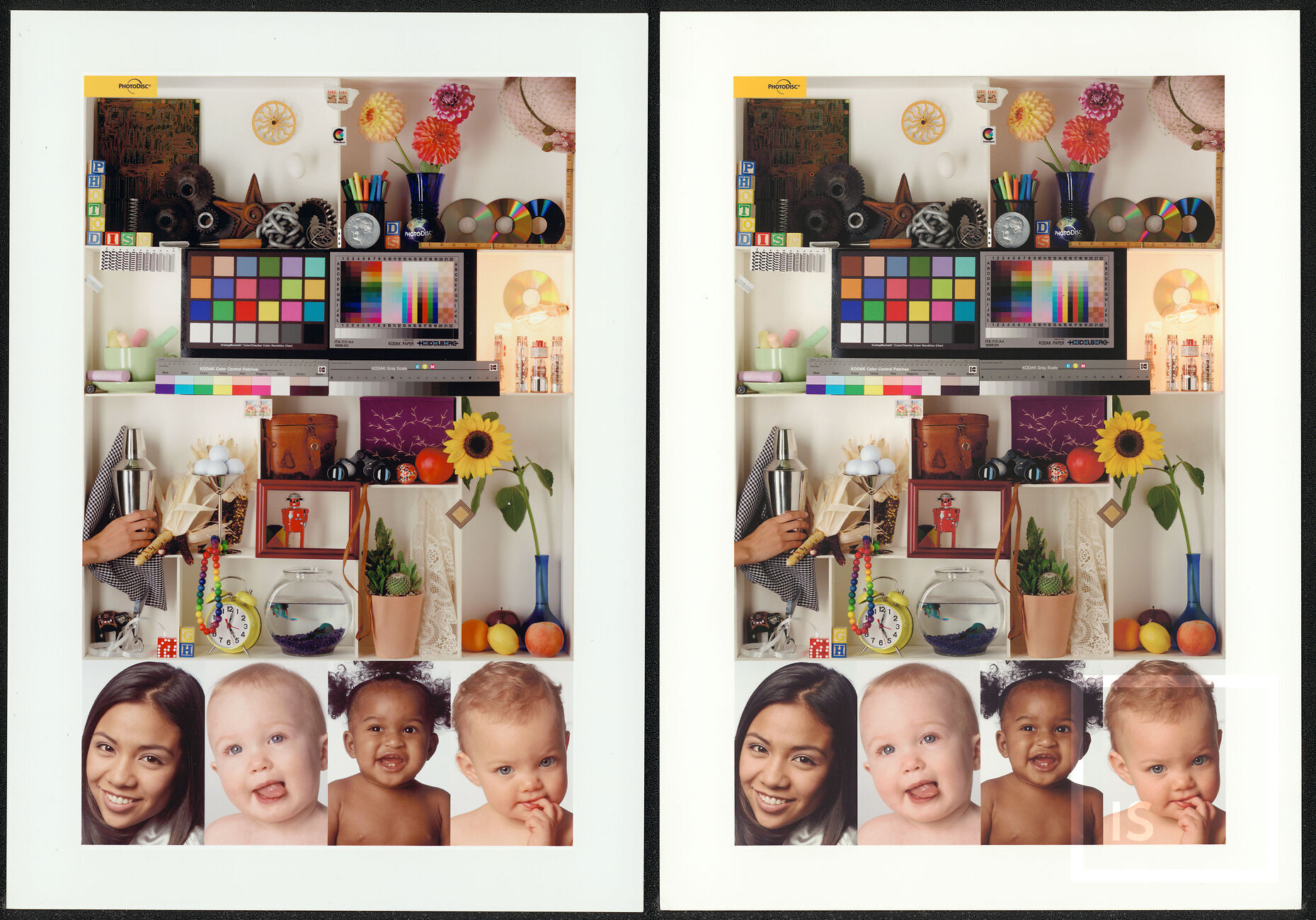
Once I realised my mistake, I then made two proper prints with the new profiles. See them below.
Of course, these scans, presented against the stark white of your monitor, aren't a great representation of the results - you'd want to evaluate the actual prints under a proper print viewing light, of course - but I have done exactly this, and they are really quite good prints.
MUCH better than the out of the box results. Not up to the standards of what you get from a properly profiled Epson P906, and of course these are not archival prints, but certainly post profiling these prints are up to the sort of quality you'd want for the e.g. the greeting card market, or typical family printing.
One thing you may be wondering, especially if you're new to ICC Profiling, is why the two prints don't match 'exactly'?
This is because profiling seeks to make the most accurate prints, but whilst taking the characteristics of the base material into account - e.g. here we have two very different papers, with two very different white-points. The Smooth Pearl (left) has a very cool whitepoint, as is popular with commercial resin coated papers, and the Photo Rag a more natural, warmer white, as is popular with fine art materials.
Good colour management, in the form of custom ICC profiling, is as important (arguably, even more important!), with more basic machines than the expensive fine art machines.
These relatively humble machines have their uses, and custom ICC Profiling is an inexpensive mechanism to drastically improve the print quality results you can get with these machines.
Thanks very much for the fast, lovely and personal service. I could tell I was in the best possible hands right from the beginning and I really appreciate how you guided me expertly through the process. The print quality is exceptional. Very excited to have an Image Science print!