Please note that we are open by appointment only (except for click and collect pickups once notified ready).

Eizo CG2700S - Evaluation of the First of Two New Eizo Flagships

15th December 2022 Product News

After a long gap in supply - a fair chunk of 2022 passed without any Eizo ColorEdge CG models being available in Australia - we've finally got our hands on the first of Eizo's new generation of flagship monitors.

These are the best of the best, the industry standard high end monitors for all forms of imaging work. Be it Photography, Video, VFX - really any content creation task within the Graphic Arts - for many years now Eizo have set the standard.

Not inexpensive, but quality through and through. That's the Eizo promise. Let's see if they live up to it...


Some History...

For most of my professional imaging life (that's more than 20 years now!) - Eizo ColorEdge CG monitors have been seen, near universally, as the Gold Standard for imaging monitors.

In the early years of LCD monitors - back in the early to mid 2000s - it was fair to say just about every other monitor maker could simply be dismissed - the reality was that most monitors from most makers, at that time, were just absolute junk.  (NEC were really the only other company to come close, but they had a much more chequered history in terms of support etc.)

In a way, I see the history of Eizo in this market as mirroring the history of Image Science.  We started our business, way back around 2002, because digital services available in Australia at that time were, basically, appalling, or simply non-existent.  (And indeed, even non digital services from most 'professional' photo labs were absolutely appalling, too!).  A $200 price, per scan, for a pathetic quality scan from the (not surprisingly!) long defunct LabX was seen as normal.  Just what things cost.  The price was a shocker, for sure, but the real insult was the quality of the result - people in those old school labs clearly just did not understand the digital revolution.  (Sure, the scan was vaguely in focus, but God help you if you wanted to hang on to your shadow detail, or achieve anything close to colour accuracy...).

What was needed, both in terms of hardware options, and in terms of imaging service companies, were people who really understood the digital domain and could thus provide real quality.   Not just quality as good as what old analogue techniques could produce, but quality and consistency far above that level.  And we very early picked Eizo as really the only choice for screens at that time, for serious imaging work in the digital domain.  Indeed, a fair part of our own early quality advantage in this area was due to the fact that we invested in these sorts of things - Eizo monitors, Imacon scanners and so on - whilst most other places were bumbling around with their Apple monitors with the bright pink corners, and what have you.  Using, and really understanding, top quality tools was (and is) the only way to get top quality results.   But some folks simply could not go past the idea that a digital imaging monitor was whatever crap-box Officeworks was selling that day.  

To do really high quality imaging work, you must be able to see your images exactly as they really are.  This is what Eizo's let you do.  This is what they have let you do for really almost the entire history of digital imaging work, as it has existed as a serious industry.    Images are ultimately just numbers.  But those numbers have very precise colour meanings, and it's the job of the monitor to translate those numbers into visible colours with the highest precision.   Quality always costs.  It's just not possible to engineer a really refined device, to push the boat out on what is possible, without charging a good amount for your products.

Of course, time has not stood still.  Other companies have not stood still.  Eizo are no longer so dramatically ahead of their competition.  And yet...when you use one, and particularly one of their higher end options, it's hard not to think that, in fact, they're still really quite a long way ahead.

Introducing - The Eizo ColorEdge CG2700S

Eizo ColorEdge CG2700S 27" Monitor
27 inch, 2.5K version of Eizo's flagship CG self-calibrating monitors. For creative professionals in any graphic arts/video field.
N.B. This Product is on Back-Order.
▪ We expect to start shipping these early July.
Free Courier Shipping to most locations! (See notes).

$3,529 RRP $3,927   (Save $398!)
  • Panel Size / Ratio27" / 16:9 (1.78:1)
  • Native Resolution2560 * 1440
  • Panel TechnologyIPS
  • Direct Hardware Calibration Support?
  • In Built Sensor? (Calibrator)
  • GamutWide
More info

Ok, so this is one of two new flagship monitors from Eizo.  This is the non-4k version.  It's 'WQHD' (i.e. 2560 by 1440) - the other new flagship is the exquisite CG2700X, which is very similar, but 4k (well, UHD, technically - 3840x2160).    We'll be talking more about that one very soon, in the second of these articles (...should be published in Jan 2023).

Is it fair to call a new monitor, in 2022, a flagship, if it is not 4k?  Well, I suppose that is arguable, but as ever colour quality utterly trumps more pixels, and that's what this monitor is all about.

Let's have a closer look.

Eizo CG2700S

Key Specifications

The Eizo CG2700S is a cross market model, designed in response to growing cross-over needs of working professionals in the Visual Arts.  That is - it's designed to be a great model for both still image work, and video work.  And there's no doubt a model that supports both of these sides of the industry is sorely needed - amongst our own client base, we're increasingly seeing people whose work bridges those domains. 

It's the successor to both the CG2730 and CG279X, and combines the best features of both, and improves further on them.   This is exciting for us as those are the core monitors we've used for our most demanding services work (most notably the very challenging work that is Art Reproduction) - for the last 5 plus years (and prior to that, previous Eizo CG models).  We know and trust the CG models to be the best choice of tool to support the most demanding work we do.  We will thus again be putting this new marvel to intense use ourselves, as our primary decision making screen, for our most demanding work.

Here are the highlights:

  • 27 inch, WQHD (2560x1440) Resolution Panel
  • Wide Gamut Support (99% AdobeRGB, 98% DCI-P3, 100% sRGB).
  • 'True Blacks' support - i.e. high contrast - 1600:1 panel
    (the blacks are very noticeably improved over previous models, even the CG279X)
  • High Brightness (400 cd/m2)
  • Excellent viewing angles, highly uniform panel
    (including with those inky deep blacks and shadow details)
  • Fully automatic built in calibration.
  • Significant HDR Support.
  • Sleek new exterior design (ok, some of you may not care much, but honestly it's nice to see Eizo bringing a bit more pizzazz to the table!)
  • Fantastic array of inputs and connectivity - HDMI (although note caveats below), or the preferred options of DisplayPort, USB-C (inc 92W power delivery), even LAN(!) etc.   No SDI unfortunately.
  • The whole package - hardware and software - is just very refined, reliable, easy to set up, and a joy to use.
  • Price (at time of writing) around AU $3800
  • 5 Year Hardware Warranty from Eizo
  • Lifetime support from Image Science - as countless Eizo owners know, you can contact us at any time during the very long life your monitor will have, if you have a question about it. 
    We're here to help.  (It's literally a near daily occurrence here that someone asks us how to hook up their 8 year old Eizo - still going strong - to their new computer!).

Close to $4000 is a significant investment, no doubt.  But - and I will keep on saying this because it's true - it's about the same price as just one decent lens.  And you will use your monitor to make core decisions about literally every image you make.   It's the same price a decent computer - but it will almost certainly outlast any computer you buy, in terms of useful life.

If you're a working professional seeking to deliver top quality work, consistently - then this monitor is - genuinely - a bargain.  An obviously sensible investment in what is probably the most important tool in your toolbox, as a creative image maker.  Not a professional?  Well, it all comes down to how much you value your hobby and your time - whilst at it is core, it's a top notch professional tool to help people make a living, it is also just a wonderfully pleasurably and trustworthy device to use and enjoy; one that brings tremendous pleasure to the process of creating and working with images and video. 

Eizo have built something that can master very technical things, and yet at the same time is really very simple to use.  It won't magically teach you everything about photography, video editing, or colour management - but it truly is as set-and-forget as any monitor on the planet today.  Once you've lived with built in calibration for awhile, you will never want to go back to a manual approach!

The Eizo CG2700S

Who Is It For?

Who is the Eizo CG2700S For?

  • Photography and Video Professionals, VFX and all other Graphic Artists
  • Serious, enthusiastic amateurs working in those same areas
  • People wanting not just superb quality, but also superb ease of use. 

The most likely customer for this monitor is a professional (or serious enthusiast) - working in Photography and/or Video, or both. Of course, there are many other potential customers in Video, SFX/VFX, grading, graphic designer, illustrator, architect - really just about anyone in the Visual Arts & content creation areas.  Indeed, Eizo have made massive strides in this market and these monitors are now used extensively by just about all the major VFX houses (ILM, Weta, Pixar etc.).

It's a long established fact that Eizo CG monitors are the benchmark for colour accuracy and reliability with still image work - they're the monitors most people working in professional imaging aspire to own. I think the key new thing these two new monitors bring, as an extra, to that, is their new abilities in the areas of higher brightness and contrast - and support for HDR curves - making them more capable than ever for video work as well.

These new monitors now offer sufficient performance - indeed excellent performance - for a great variety of video tasks, including HDR work. Other monitors have claimed this, and in some cases (Eizo's X models, like the CG279X) - have been pretty good already. But these new models take a real step forward in this area. More on this below and in our companion CG2700X evaluation. But what this means, for a typical imaging person, is that these monitors can act as your bridge as you between photo and video work.

Another key category of customer for this monitor is the person who is looking high quality and for genuine ease of use. It's fair to say calibration is....at best, a dry and boring, but necessary, task. Even twenty plus years into the era of monitor calibration, there are still many folks who simply don''t do it because they find it all too hard, or they simply can't be bothered.

Eizo's self calibration solution - an in-built sensor combined with their excellent ColorNavigtor software - is the ultimate solution to this problem. Whilst you do still have to do a little initial set up work (it takes a few minutes if you already know what you are doing; an hour or two if not)...you can then tell the monitor to take care of its own calibration forever more - that's truly as 'set and forget' as you can currently get.  Basically, if you don't like worrying about calibration but do want accurate colour? This is the solution you're looking for.

Who is the Eizo CG2700S Not For?

  • People who genuinely need 4K
  • People who really want 4K
  • HDR Graders needing to work on a true HDR display


Of course, these are not true 'broadcast HDR' monitors for the highest levels of HDR grading work - after all, the max brightness here is around 400 cd/m2, nothing like the Dolby Vision spec. that goes all the way to 10000 cd/m2 - that some top end broadcast monitors can apparently reach!  But, if you need one of those, you will also need to add another zero to the price tag (at least!).   (And more than likely you'll be spending a whole lot more again on building a proper edit suite!). But those monitors are in a totally separate category, really - designed for studios and often in limited use, even there.

The CG2700S, being 2.5K, rather than 4K, is also not for people who just can't live without 4K - because they're already so used to it and can't bear to go back to something slightly less sharp, or those that have a legitimate 1:1 pixel editing/grading need. Those folks should look to the CG2700X of course.

(I wrote a great deal more about the issue of 4K in my CS2740 evaluation, if you want to read more about that).

And, of course, the price tag is prohibitive for some. But relative to other professional tools in this area - be it the latest camera bodies, lenses, drones, and what have you - the price is quite reasonable. Especially so when it is probably the most important link in your whole chain - you simply can't expect to produce superb quality results if you can't see what you've captured, if you can't see the changes and decisions you're making in your editing reflected accurately in the visual result.

The CG2700S

Connectivity, Docking Station

First, the basics - for your video connection, you get: USB Type-C (DisplayPort Alt Mode, HDCP 2.3), DisplayPort (HDCP 2.3), and HDMI (Deep Color, HDCP 2.3).  Do note, though, that the HDMI does, rather oddly, NOT support HDR.  If you want to input an HDR signal, you'll need to use DP or USB-C, which I think it a bit of a miss on Eizo's part, albeit one that should be easy enough to work around in most setups).

This means you have all the major inputs covered.  We recommend you use USB-C, if you can, and failing that, Display Port.  Both those connections, in Video terms, support 'all mod cons', including HDR, and are very reliable.  HDMI, designed for the AV market, lingers behind and is always a bit more 'risky' - some computers will default to using limited range RGB (so 16-235 instead of the full 0 to 255) - and we don't want that.  So avoid HDMI, if you can.  In practise it is normally fine (e.g. you can tell your computer to output full range, explicitly) - but why not use a better, more modern connection, if you can.

Interestingly, these two new models are the first CG models to feature an integrated LAN (RJ45) port.  This really cements the 'monitor as docking station' solution.

Imagine you have one of these in your Studio.  Perhaps you have a CS unit, or another CG at home.  You're tired (isn't everyone?) of looking after multiple computers, so you invest in a powerful laptop - a MacBook M2, or perhaps a beefy Surface machine.  Almost all of these will now have USB-C.

But - it's not just video.  We're finally seeing the full promise of USB-C.  You can connect the Eizo CG2700S to your laptop and that just one, single cable running back to your laptop will do all of these things:

  • Charge your laptop (with up to 92W Power Delivery over the USB-C, if your laptop supports USB-C charging, as most now do)
  • Carry the Video signal (i.e. the signal that gives you a picture on the monitor!)
  • Carry the Data signal (which allows Eizo's ColorNavigator to communicate directly with the monitor's hardware for calibration and control)
  • Enables the downstream USB ports on the monitor
    There are 4 of these - two slower speed USB2 ports which can be used for a proper mouse and keyboard, leaving two high speed USB 3.1 ports for e.g. USB storage or similar
  • AND Carries the network traffic giving you a high speed (Gigabit, 1000T), and completely stable ethernet (rather than wireless) connection to your network

Clearly, this makes the Eizo CG2700S a super simple, powerful, and complete docking station for your laptop.  Just bring your laptop, connect just that one cable, and you're essentially sitting at a full desktop station.

For me, personally, this probably spells the doom of the three separate computers I currently use - all of which are due for an upgrade really.  I currently run a desktop PC at home, another at work, and an old laptop for travel purposes.  This is, frankly, very tiresome - it's just a lot of admin keeping them all up to date, and consistent with settings etc.  But I've always been too irritated by the need to hook up a spaghetti of cables at each end, and all the other compromises of using a laptop as my main machine - wireless, in particular, is just a pain when you're constantly dealing with very large image files, as I do.  And most modern laptops don't have an ethernet port any more - so you have to use yet-another-dongle.  Wireless, under perfect conditions, can of course be fast and effective.  But so often, in practise, it slows down and just makes simple things annoyingly slow.  Give me ethernet any day.

So I think offering a LAN connection is a great idea, personally.  It's just one of those well thought out extras that make the monitor much more useful, in many more scenarios.

The downstream USB ports continue to be on the left side of the monitor.  This is always a bit awkward, and I know e.g. future BenQ model are going to move those so they are accessible from the front of the screen (basically built in to the lower bezel - invisible, normally, but easy to get to.   That said, having them on the left does mean that permanently connected things (like a mouse, keyboard, or USB speakers) - is a bit more tidy and out of the way.  The perfect monitor would, I think, have some at the side AND some at the front.   Maybe we'll see that eventually!

The CG2700S

Other Ergonomics

This is a typical Eizo. The new casing is sleeker, sure, but it's still very much a 'utilitarian' look. So whilst I think they're better looking than any previous Eizo, and better looking than other monitors in this segment, they're still not actively pretty. But, realistically, that's of very little importance to most, and they're definitely not ugly (older Eizos from 10+ years ago were often pretty ugly, honestly!).

It has the usual unlabelled touch buttons (sigh). But, they're very responsive touch buttons and they symbols that pop up as soon as you use them are quite clear. The menu structure is very good and easy to follow. You probably won't use the menus, much, though, as you'll likely control everything through the ColorNavigator software. Note you can adjust the brightness of these 'buttons' - from off, to very bright.

There's a great stand included - the base is smaller than previous ones, so the physical footprint on your desk is small, which is great. The stand has all the tilt and travel you could hope for (including support for portrait mode, although of course then the hood doesn't make much sense).

If for some reason you need more than the included stand can offer, there's a 100mm x 100mm VESA mount on the back, and the panel weighs only about 6.5kg, meaning any standard replacement stand or arm will fit. There's also a carry handle on the back making moving it very easy to move around your studio if need be.

The monitor hood (included in the price, thankfully!) - is sleek and, thanks to Eizo's unique magnetic attachment system - incredibly easy to fit and remove. There's no option for a double hood, if you have two of these, unlike BenQ's nitfty offering.

There's no fan, and the monitor does not get excessively warm. It's completely silent in operation apart from the odd beep when you e.g. press a button on the monitor. Which you can also turn off, if you love the sound of silence.

The Eizo CG2700S

Initial Setup and Documentation

The 'User Manual'

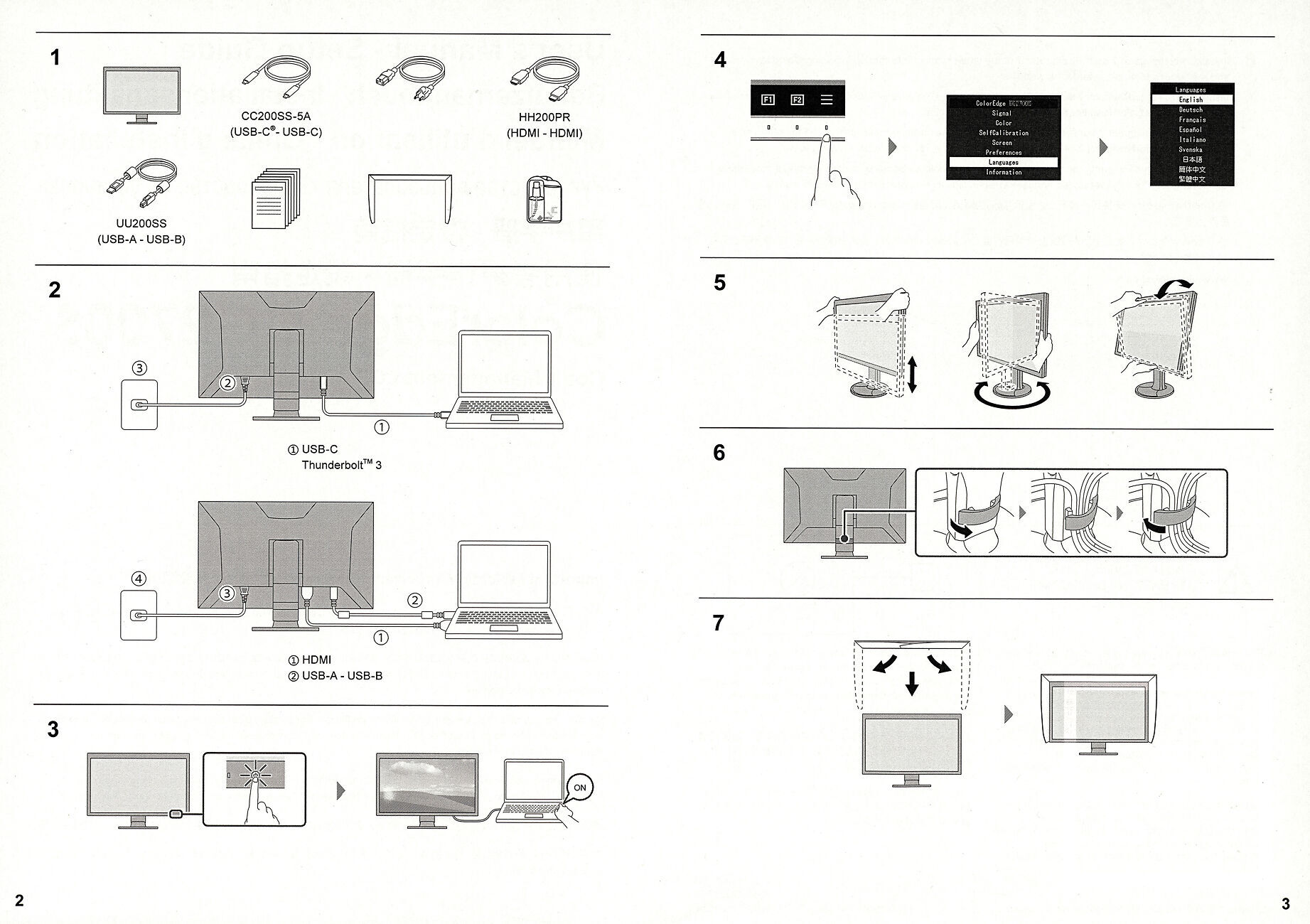
This is, basically, all the set up documentation you get with your Eizo CG2700S (kudos to Eizo for supplying this in a paper envelope and not a plastic bag, though!).

The Not So Good:

It's fair to say, there's significant room for improvement here.  In terms of instructions...there's a distinct lack of detail.  There's just not much hand holding there to help folks get going. 

The implicit assumption is the user is completely familiar with attaching modern monitors to modern computers, and clear on what the best choices are, when it comes to cable usage.  From long, hard experience, I can tell you this is not true. Even for people buying monitors at this level.  It's a constant cause of confusion.

If we look at what little is offered - well, look at Step 2 of the instructions - what does that even mean?  Is one to glean from this that first one should attach USB-C, and then attach HDMI, and then another USB cable?! It's not at all clear this is an either-or scenario.  Or that there is another option (DisplayPort, although you'll have to provide your own cables for this).

What is lacking is really decent, clear, Getting Started guide.  One that talks you through how to unpack the monitor, the best cabling options, the first switch-on, checking it all to make sure things are as they should be, and then moving on to calibration.  Like....this one:

And of course this monitor is designed to be (and, if fact, is) - pretty much the ultimate solution to colour accurate work.  What do they tell you about actually implementing that?

Just one line on the back page - go and get Color Navigator.  And....then what?  Again, what's needed is a detailed, clear guide, to take you through the many options and get you started on your colour accurate journey.  Like...this one:

Now, of course Eizo do (finally!) have some of this on their website (although, as with many brands, their are differing sites for differing geographic locations, and it gets fairly confusing fairly quickly, unfortunately).  And...that content is not even mentioned in the paltry User Guide you get.  So how are you supposed to know that?  (Here, in PDF form, is the full user guide)

And really - an almost $4000 device should come with something easy to follow to get you past the basics.

Unit Report

The Good:

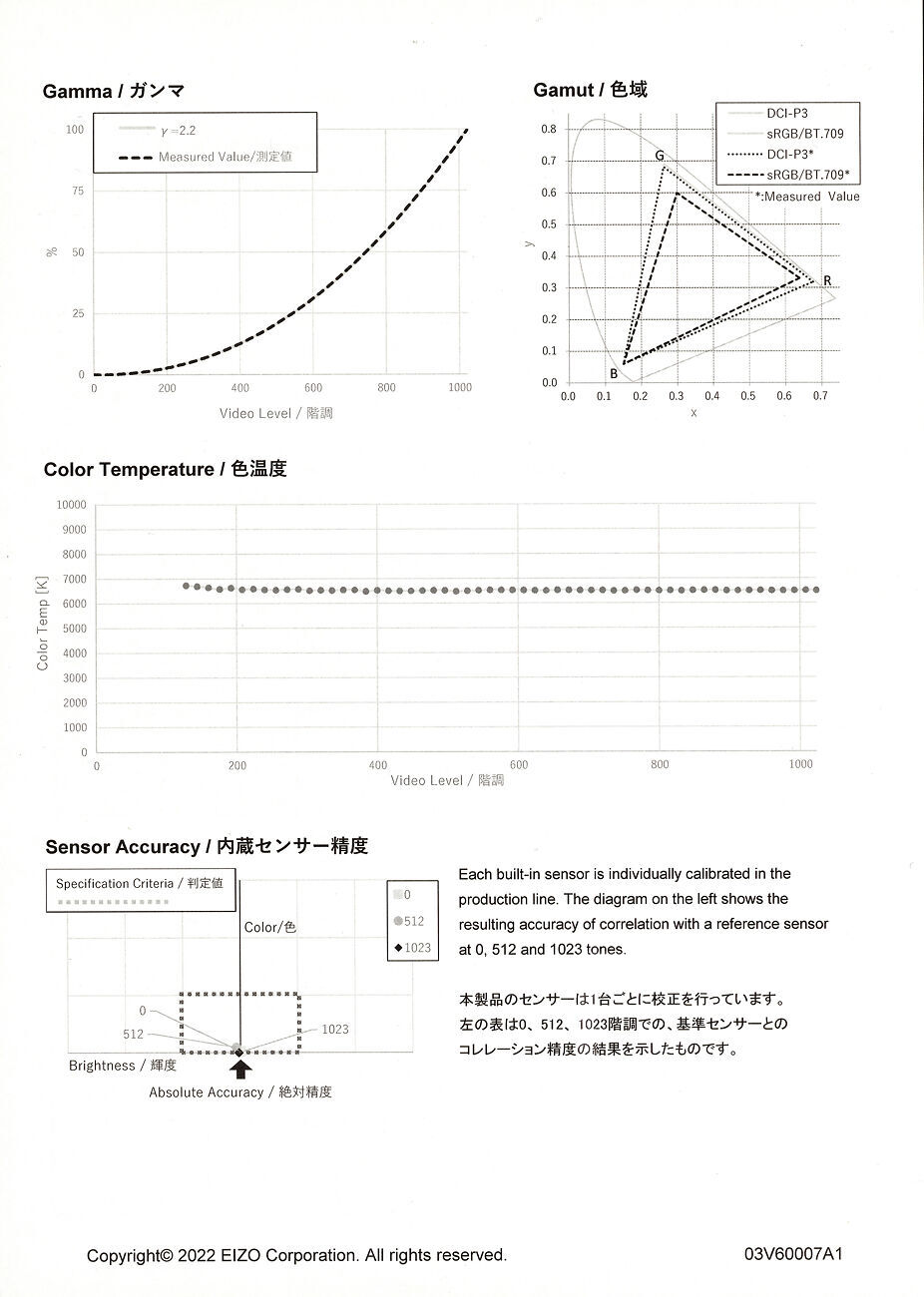
On the other hand, you do get an individual calibration report for your particular screen. 

This shows uniformity, gamut, gamma tracking, in-built sensor accuracy etc.

You can see the report for ours here.  The short version is that it's an excellent, wide gamut screen with an appropriate sensor for calibration built in.

It's still fair to say (again) that not a great deal is actually explained, but it does give reassurance, at least, that one's specific panel has been properly tested.  (And if you're concerned about these things, then you probably know what they mean already, fortunately!).

In our experience, there's no better brand for quality control.  Hardware issues with Eizo monitors are really, genuinely, really quite rare.  Rarer than with any other monitor brand we've experienced.  And of course, were you to have an issue, you're backed by Eizo's 5 year hardware warranty, plus our own lifetime product support.  

Evaluation & Quality

I'm going to go deeper 'into the weeds' about technical things and HDR use when I follow this article up with the second part of this series, about the CG2700X (now published), so primarily in what follows I am discussing this monitor from the point of view of doing high end, still image work, particularly within the fine art context. This is a context I have been working in, daily, intensively, and at the highest level - for more than 20 years now - so I know exactly what sort of equipment supports this work best.

The monitor I currently use the most, day to day, is my beloved, adored, Eizo CS2740 and it is, in one word, great. It's wonderfully sharp, and has proven itself over the last 18 months or so to be highly reliable and of sufficient colour accuracy for all the imaging tasks I have thrown at it. I do still prefer to do the most tricky, exacting work - difficult art reproduction jobs for example - on my older CG279X, though - it's just that little bit better again, in colour terms - or at least, I feel it is, so I like to double check my work there. But in truth I can't recall a single moment when the performance of the CS2740 has been anything less than excellent.

If I were to have two criticisms of the CS2740, those would be that it lacks the ease of use benefits of a built in calibrator (easily solved with an external calibrator, but...one does get use to one's robots doing the hard work...), and two - the contrast. Now, I almost always specifically use my CS2740 in a low contrast mode because my primary domain is fine art print work - so, in fact, I want the monitor's contrast to be reduced so that what I am seeing is more like the prints I will get. Thus, in practise, the lack of contrast is not actually an issue for me.

But...every so often, I do want to watch or do something in full contrast, such as a bit of video watching, or editing something for YouTube etc. And when I do this on the CS2740, I do note that the contrast, whilst definitely not bad, is also not especially impressive. The CS2740 does have some very mild noticeable IPS glow. The blacks are black, but they're not...inky black. If the ambient light level is low, I do notice it. Now my reference here, and the device I usually watch video on, is a top end Panasonic OLED...that that has just exquisite, black-as-pitch blacks. And really, it's an unfair comparison, as no LCD is going to match an OLED for blacks, ever.

So that is the context for where I begin my CG2700S evaluation. Against a sharp 4K panel with excellent colour accuracy and blacks that don't wow, but also don't affect me, in practise, with the work I usually do.

I'm also still regularly using a CG279X, one of the first higher contrast CG models, as well. That's not 4K, but it does have better blacks than the CS2740. But I've also found that a bit more prone to viewing angle issues - I'm not sure of the exact reasons as such (panel construction is complex, there are many layers involved), but I do find that one just a bit more finicky in that regard and I have never quite loved the CG279X, as much as the three (!) CG277s I had before it.

It's Fast...

Turning it on, you notice it's really quick to fire up. For comparison, we run a BenQ SW321C in the office - which is a great big screen option overall - but one consistent niggle with it (and indeed all BenQ SW models to date), is just how slow they are - it's like 20 seconds or so for it to wake up. It doesn't sound like much, but it's just a real usability niggle that gets to you after a while.

From cold, or from sleep, the Eizo CG2700S is almost instantly ready to use in the basic sense. They do say for colour accurate work you should wait three minutes. Indeed, everything you do with this monitor is fast - calibration, mode switching, whatever - it's all as fast or faster than I have ever seen in a monitor of this type. I mean, it's not normally something thinks about with a high end graphics monitor, but it's just, noticeably, very fast, and that is a a definite nicety.

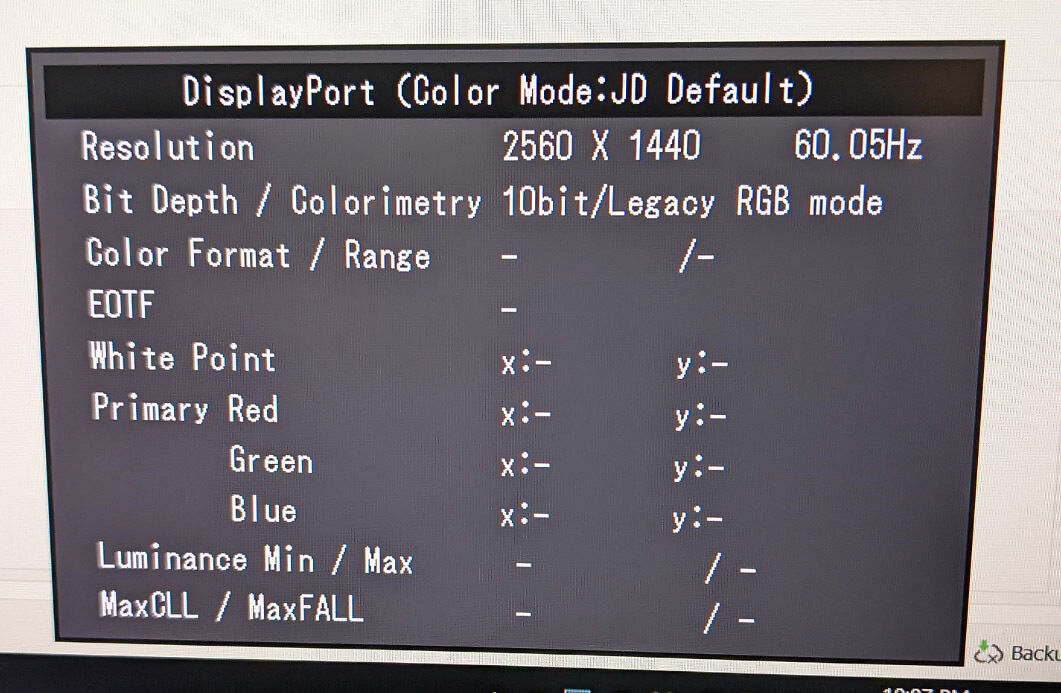
As it wakes up, you get an information panel confirming all aspects of the current signal.

This is great (and long overdue for monitors generally!) as it explicitly confirms exactly what the monitor is receiving - resolution, bit depth, colour format etc. In most standard setups, a fair bit won't be filled in as a lot of the potential information is HDR related. But all the key info you need is always there, and very handy information to have - for trouble shooting and just to confirm that what you think is going on with your monitor is, in fact, what is going on.

Blacks!!!

The other thing I immediately noticed is the blacks. They are markedly darker and improved over even the CG279X we have, and all the other Eizo ColrEdge models we've got or previously had here (CS2740, CG2730, CG277s, etc). There's a depth and uniformity to the blacks, including the troublesome corner regions, that I've never seen from an IPS panel before. It's a big step up for sure. Again, for me, I tend to use these in print scenarios, with the contrast set very low, to emulate paper, but in other contexts where full contrast is desirable, this monitor has distinctly more to offer than previous models.

Do not misunderstand me, though - they're not perfect, OLED style blacks, though - it's still an LCD, there's still some IPS glow, the pixels do still emit light when they are black - and it's still the case that these LCDs are not best used in dark environments when you can definitely notice those elevated blacks.  But it's a real, tangible improvement over prior models for sure.

Picture

This will be no surprise for a monitor in this class, but even to a highly trained and sensitive eye it is immediately clear the colour reproduction - even just in the factory preset modes - is excellent.

I do notice the lack of 4K. I have been spending a lot of time with 4K monitors, and it is slightly jarring to go back to a non 4K monitor. It makes very little difference with image work - indeed, there it is barely noticeable - but it's definitely noticeable when browsing, emailing etc. Text is just not as crisp and as page like. If you simply can't live with this trade off (for the exquisite colour accuracy), then you need to look at either the CS2740 (my evaluation here), or the CG2700X.

Until recently, though, I have had a 2.5K model like this at home (CG279X), and a 4K on my desk (CS2740) - swapping between them daily. and honestly, in practise I barely noticed the difference and have worked comfortably with them both for a couple of years now. I could have put in a 4K at home - we have several spare options - but for me the colour quality is the critical thing, so I was quite happy to have the 2.5K at home, knowing that all my photo work would be in very safe hands. And I am genuinely picky about this sort of thing - so I am confident that if I can deal with that compromise, then most other people could too.

Uniformity is superb. No one does this better than Eizo, or indeed really comes to the same level. It just makes you forget that uniformity can ever be an issue with screens.

Calibration

As usual, we use ColorNavigator 7 for this (there are other options, particularly if you work in video - more on this in the second part of this article coming next year).

It's fast to calibrate. Like, really fast. If you know what you're doing you'll be through your first calibration and validation done in probably less than 5 minutes.

The integrated sensor is hidden in the top bezel (there's a smooth enlargement in the bezel in that area if you look carefully). When needed, it pops out and away it goes. And worth reminding - you can schedule this to happen overnight so you never even really see it happening. Or to happen at 'first available opportunity' after you next finish using it.

In terms of calibrations, I have at this stage spent time with two main setups - a low contrast (200:1), 5800K setup for fine art print work, and a full contrast, 6500K higher brightness setup for general browsing, content consumption and for preparing images specifically for the web and/or viewing on my Panasonic OLED (which I love just about as much as prints...).

(I have also done a high brightness target for video work, but more on that in the next part. My one comment is - it takes some getting used to to sit in front of a monitor running at 400 plus cd/m2 if you normally sit at one running 90 cd/m2!!).

The fine art print setup really makes the CG2700s look near identical to the CS2740, with the exception of the resolution. It would be very very hard to tell them apart - but the CG2700S is just ever so slightly more uniform and 'clean' looking in the grey scale - but you'd never see this unless you were specifically nit picking them side by side.

Where there is a very substantial difference that is immediately noticeable is the full contrast calibration. The CG2700S really pulls ahead here (and has me rubbing my hands in glee to know I'll shortly be using a CG2700X...!). The higher contrast of the CG2700S is not subtle, it's very noticeable, and you just can't escape noticing how improved the blacks are. Even more noticeable when you're in a somewhat darker environment. Eyes love contrast, and the CG2700S certainly gives the eyes a lot to love.

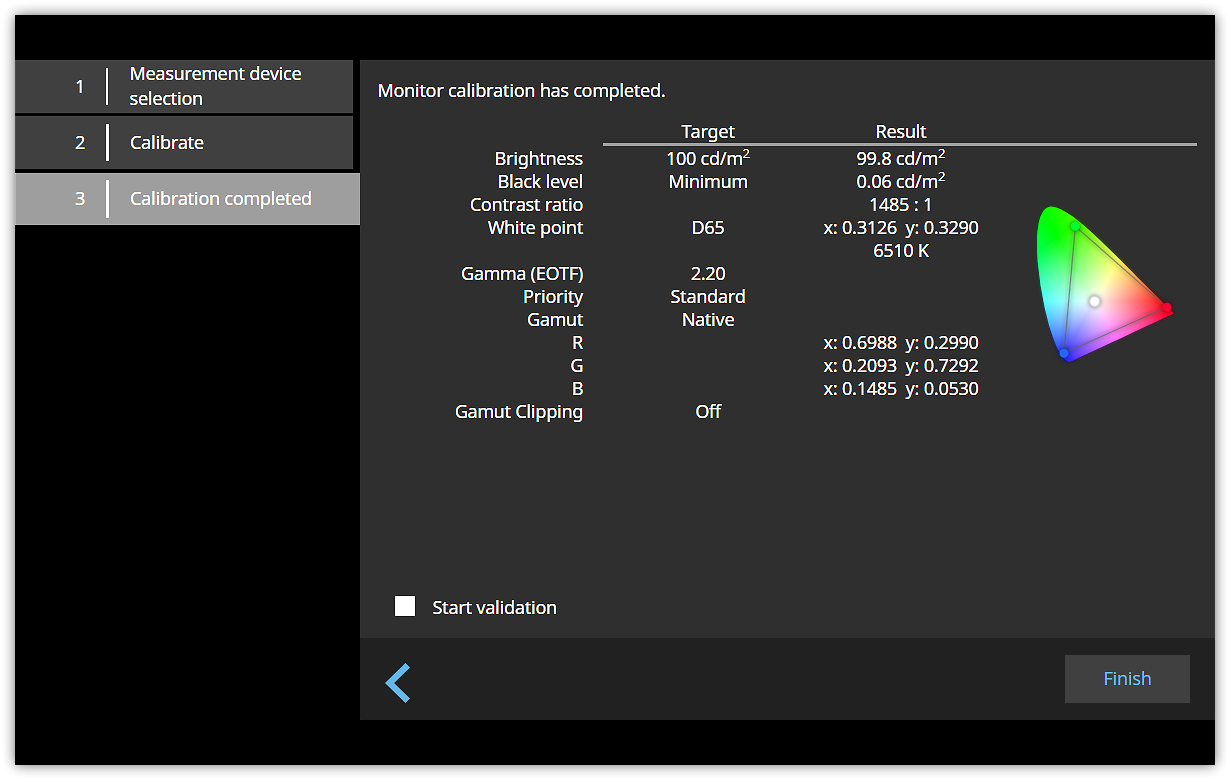
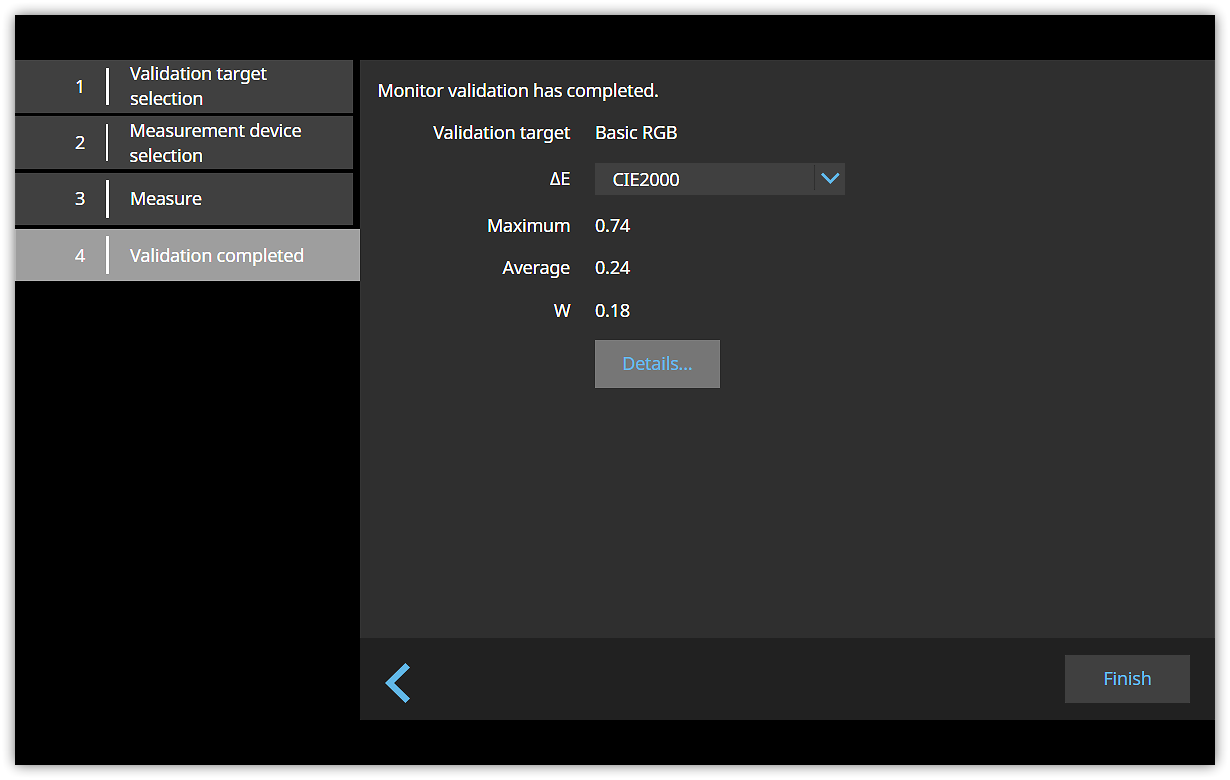
Technically speaking, the calibration results are all in the <1 dE difference domain, usually distinctly less. Excellent results both technically and visually, exactly as I would expect. With the exception of the issue of resolution - which you only notice if you're quite close to the screen and looking for it - there's just nothing to fault here - it's spectacular. When looking at images I have worked with for years, everything looks exactly right and I have complete faith in the accuracy of the representation I am seeing from the CG2700S.


Results of my first full contrast calibration - you can see even post calibration the contrast remains well over 1000:1 and the average dE is just 0.24.  Everything is bang on:

Summary and Conclusion

For any working photographer, or still image maker/editor of any type, this monitor will do a spectacular job for you and remain reliably, ongoingly, accurate - for years and years - with basically zero intervention once set up thanks to the scheduled automatic calibration system. Even though I've been using that for years, I still get a kick out of it. It's just so nice to be able to trust a machine the way I do Eizo ColorEdge monitors.

(God only knows, Epson could learn a thing or two from Eizo - you honestly can't take your eyes off their printers for a second, they are just ludicrously untrustworthy machines...Canons, too).

We've really looked at the use of this monitor in our primary context - for still  image editing work, primarily for fine art print. And really, the executive summary is that there is simply no better tool for our fine art printing work than these new Eizo CG monitors. Whether it's photographic work, art reproduction, or illustrative/graphic design work, these are simply the best there is - no compromise solutions to those difficult problems. We trust our most difficult work only to Eizo CG monitors because, as yet, no one has come close to the accuracy, repeatability, and totally well though out experience that an Eizo ColorEdge CG monitor provides.

Scratching The Surface...

This evaluation only scratches the surface of the capabilities of the CG2700S and the CG2700X.

For an evaluation on the CG2700X, and more on things like HDR and video work, plus the more advanced features of these monitors, see also:

Eizo ColorEdge CG2700S 27" Monitor
27 inch, 2.5K version of Eizo's flagship CG self-calibrating monitors. For creative professionals in any graphic arts/video field.
N.B. This Product is on Back-Order.
▪ We expect to start shipping these early July.
Free Courier Shipping to most locations! (See notes).
$3,529 RRP $3,927   (Save $398!)
  • Panel Size / Ratio27" / 16:9 (1.78:1)
  • Native Resolution2560 * 1440
  • Panel TechnologyIPS
  • Direct Hardware Calibration Support?
  • In Built Sensor? (Calibrator)
  • GamutWide
More info
Eizo ColorEdge CG2700X 27" 4K Monitor
27 inch, 4K version of Eizo's flagship CG self-calibrating monitors. The best choice for creative professionals working in the visual arts.
N.B. This Product is on Back-Order.
▪ We expect to start shipping these early July.
Free Courier Shipping to most locations! (See notes).
$4,779 RRP $5,335   (Save $556!)
  • Panel Size / Ratio27" / 16:9 (1.78:1)
  • Native Resolution3840 * 2160 (UHD 4K)
  • Panel TechnologyIPS
  • Direct Hardware Calibration Support?
  • In Built Sensor? (Calibrator)
  • GamutWide
More info