Calibrite Display Pro HL
The Display Pro HL allows for accurate calibration and colour profiling of LCD, mini-LED, OLED and projectors, up to 3,000 cd/m2 (nits).
Please note that we are open by appointment only (except for click and collect pickups once notified ready).
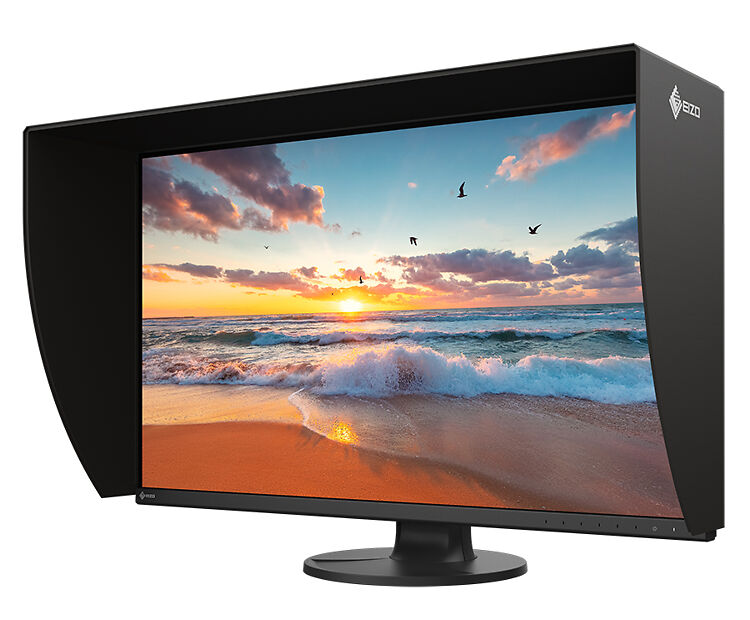
EIZO's ColorEdge CS3200X is a 31.5" 4K wide gamut IPS monitor that finally brings colour accurate, directly hardware calibratable performance to the 32" class at a sensible price. With the BenQ SW321C now discontinued, it's the only screen of its kind currently on the Australian market, and EIZO have included the light shielding hood as standard for the first time in the CS line. It's sharp and beautifully uniform, and it's excellent value for a screen this size.
EIZO have finally built the monitor a good number of our customers have been begging us for well over a year for now - a colour accurate, directly hardware calibratable 32 inch class 4K display, at a price that doesn't require a small loan. The ColorEdge CS3200X is a 31.5 inch (near enough to 32") 4K wide gamut IPS panel that sits at the top of EIZO's CS range, and it has arrived at a rather convenient (and fortuitous) moment. With BenQ's SW321C recently discontinued, the CS3200X is, as far as we're aware, the only decent colour accurate, directly hardware calibratable ~32 inch 4K monitor you can currently buy in Australia for a reasonable price. That alone makes it worth a close look. Happily, it is also very, very good.

If you just want the short version, here it is.
The CS3200X is excellent, and it fortunately fills a rather frustrating gap in the market. For a while now, if you wanted a big, sharp, colour accurate screen with proper hardware calibration, your only real options were the (now departed) BenQ SW321C, or stepping all the way up to an EIZO CG - and the current 4K CG, the superb but eye watering CG3100X, is roughly three times the price and, at 30.5", not actually a 32" panel. The CS3200X lands neatly in the middle of that gap, and it does so for less than the SW321C used to cost. That alone is a great result for anyone in the market for a large accurate display.
It's sharp, as you'd expect from any 4K panel, and beautifully uniform, which is where EIZO consistently pulls ahead. The anti reflection coating is a nice step up in matte-ness over the CG2700S/X and CS2731/2740 generation. Best of all, EIZO have finally included the light shielding hood in the box as standard - a first for the CS line, and something we've been grumbling at them about for years. Add in the new three sided frameless design, a proper KVM, one cable USB-C operation and even recyclable cardboard packaging, and you have an unusually complete and sensible professional monitor.
There are only two things worth flagging up front. First, like all CS models (as opposed to the CG range), there is no built in calibration sensor, so you'll need an external calibrator such as the Calibrite Display Plus HL. Second, our one real ergonomic gripe is that the stand doesn't rise quite as high as we'd like.
Basically, this is a lot of monitor for the money, and for a great many photographers, designers, illustrators and video editors, it's going to be very hard to look past.

The CS3200X is the new flagship of EIZO's ColorEdge CS line. The CS series sits just below the more specialised (and considerably more expensive) CG monitors, but it retains all the fundamentals that matter for colour critical work: a wide gamut panel, direct hardware calibration, EIZO's Digital Uniformity Equaliser, a full set of production presets, HDR support, and the general absence of gimmickry that makes EIZOs such a pleasure to live with.
What's new here is the combination. EIZO have made excellent 27 inch 4K CS monitors for a while now (the CS2740 remains a firm favourite of ours), but a colour accurate, hardware calibratable 4K panel at this size has been conspicuously absent from their CS lineup - and, with the BenQ SW321C gone, absent from the affordable end of the whole Australian market. The CS3200X fixes that.
As always, see our product page for the complete specification. Here we'll just highlight the notable bits.
Regular readers will know that, historically, 32 inch models have never been a particular favourite here at Image Science. The reason is simple: the bigger a panel gets, the harder it is to keep uniform across its whole surface, and for still image work in particular, poor uniformity on a large screen is a real and constant distraction. For years, the only big screens we could wholeheartedly recommend for the average user were the EIZO CG319X (long discontinued) and, latterly, the BenQ SW321C, which, to BenQ's great credit, was the first ~32" panel we felt truly hit the mark at any semblance of a reasonable price.
With the SW321C now gone, that left a gap. If a customer wanted a large, colour accurate, hardware calibratable 4K screen, the realistic choices were either buy the SW321C second hand and hope, or spend around $8,000 on a CG3100X. Neither is a satisfying answer for the many capable image makers who want the size and the accuracy but don't need reference grade, broadcast mastering performance.
The CS3200X is the answer we've been waiting for. It joins that very short list of large panels we're happy to recommend, and it's the most sensibly priced entry on it by a comfortable margin.
Your overwhelming first impression, as with any panel this size, is going to be how much room there is. You can really stretch out. A good, sharp image displayed at this scale looks superb, and the extra desktop is a real productivity boost, whether that's image and adjustments side by side, a timeline and a decent preview, or simply two copies of the same file open for comparison, which is something these big screens are very good for.
There's an old adage in photography that applies to any visual art: to sell large, show large. A beautiful image shown at grand scale is far more persuasive than the same image shown small, and any portrait or landscape photographer who sells prints already knows that. A screen like the CS3200X earns part of its keep the moment a client sees their work on it.
It does pay to think about the resolution in context, though. At 31.5", 4K works out to around 140 ppi. That's a lovely, comfortable density, but it is less dense than 4K on a 27" panel (the CS2740, by comparison, is a very crisp 164 ppi). In practise this means the CS3200X trades a little of the razor sharp, print like "wow" of a 27" 4K screen for a larger canvas and slightly more relaxed pixel density, much the way the old SW321C did. For most people this is exactly the right tradeoff at this size, and 4K remains extremely comfortable on a 32" panel, with little of the scaling headaches that 4K on 27" can occasionally throw up on older systems.
And of course, being a top tier general purpose monitor is part of the deal too. We're often asked whether monitors like these are any good for "normal" work - email, spreadsheets, web apps, code. The answer is an emphatic yes. The display quality lifts all of that day to day work, and this much screen real estate makes complex multi window tasks far more comfortable.
Just make sure you have the desk depth for it. At this size, if you sit close or work on a shallow desk, 32" can start to feel like a bit much. Measure first.

This is, as ever, the important bit.
EIZO's reputation for uniformity is well earned, and it rests on things that most brands simply don't do. EIZO build and QAs their panels in house, they spend real time balancing each unit zone by zone, and every monitor ships with an individual factory report documenting its measured uniformity, gamma, gamut coverage and colour temperature. The Digital Uniformity Equaliser then actively compensates for brightness and colour variation across the whole panel, so the corners hold up as well as the centre. The CS3200X is exactly what we've come to expect on this front: clean, neutral whites and very even greys across the whole field, with none of the tinting or patchiness you tend to see on cheaper large panels. For a screen this size, that's no small achievement.
The coating deserves a specific mention, because it's a definite improvement. EIZO have gone with a more matte anti reflection surface here, and side by side it is noticeably more matte than the CG2700S/X and CS2731/2740 generation, a very welcome change, as those models could be a touch glossier than we'd ideally like. It's still not quite as good or aggressively matte as the BenQ SW321C was (which is probably the nicest matte coating of any monitor we've seen, still to this day) or the SW272U/Q are (to a slightly lesser degree than the SW321C), but it sits in a pretty comfortable place - quiet and easy on the eyes, and far less prone to bouncing ambient light back at you when you're working on darker material.
The usual IPS caveat applies, as it does to every monitor in this class. In a properly darkened room you'll sometimes see a little hint of the characteristic IPS "glow" in deep blacks, particularly toward the edges. This is simply the tradeoff you make for the accuracy and viewing angle consistency that IPS delivers, it's a non issue in the normal, sensibly lit environment a colour accurate monitor should be used in, and it's only relevant to note for those doing critical work with very dark imagery.
Two of our favourite things about this monitor are best discussed together, because they work as a pair.
First, the three sided frameless design. This is a first for a ColorEdge, and it's excellent. Losing the bezels on the top and sides makes the whole thing feel more immersive and modern, and it puts more of the focus on the image itself.
Second, and this is the one we've been asking EIZO for, loudly, for years, the light shielding hood is now included in the box as standard. This is a first for the CS line, and frankly it's overdue. EIZO's hoods have always been excellent, their brilliant magnetic mounting system makes fitting and removing them the work of a moment, but historically they've been a pricey optional extra, and far too many customers understandably baulked at paying a premium on top of an already premium monitor and consequently missed out on the benefits. Having it included, at last, is exactly the right decision. Thank you EIZO!
The two features really reinforce each other: because the bezels are gone on three sides, the hood now sits closer to the image than it could on previous framed designs. That makes it more effective at doing its actual job, which is keeping stray light off the panel. A proper grading or editing space should of course have controlled lighting to begin with, but most of us unfortunately have little choice but to work somewhere with a window, and the hood makes a real difference to comfort and to how consistently you see your work.

Gamut coverage is right where it needs to be for serious work - 99% of Adobe RGB and 96% of DCI-P3 - and the 16 bit internal LUT feeding a 10 bit output means smooth, well behaved gradients with plenty of headroom for calibration. (As always, remember that seeing all 10 bits on screen also requires your graphics hardware, connection and software to support 10 bit output.)
The preset suite is comprehensive and makes the monitor very versatile across different types of work. Between them the presets cover all the main bases: Adobe RGB for photographers and pre press, BT.709 and DCI-P3 for video, Display P3 for Apple centric setups, and the dedicated PQ DCI-P3 and HLG BT.2100 modes for HDR. The value here is flexibility. One screen can move cleanly between different kinds of work, so the monitor bought for one job still suits the next. For a magazine, agency, small studio or one person operation covering several kinds of work, that matters a great deal.
New to the CS line is EIZO's Sync Signal function. When the appropriate metadata arrives with the incoming signal, the monitor can automatically adjust brightness, gamma and colour gamut to suit the material. It's a small thing, but a nice one, and fewer manual settings to remember means fewer chances to leave the monitor in the wrong mode and quietly ruin an afternoon's work.
On HDR: the CS3200X properly supports the HLG and PQ transfer functions, so you can work sensibly with HDR material and preview it with the correct response. It is not a high brightness HDR mastering display though, and does not pretend to be one. At a typical 350 cd/m², it was never meant to stand in for a 1,000 nit reference screen, and that is simply how the tiers are meant to work. For editorial, compositing, motion graphics, retouching and preliminary grading, having the correct HDR pipeline on your working monitor is very useful. For final HDR mastering, you want a purpose built reference display, which is exactly why EIZO also make considerably more expensive monitors.

As with other EIZO ColorEdge models, the CS3200X supports direct hardware calibration.
What this means is that when you calibrate, the correction is written into the monitor's own high quality internal look up tables via EIZO's ColorNavigator 7 software, instead of the far lower quality LUTs in your computer's graphics card. This is the real deal, and it's a big part of why these monitors stay so accurate.
What it does not mean - and this catches people out - is that the monitor includes a calibration device. It doesn't. Unlike the CG range, the CS3200X has no built in sensor, so you will need an external calibrator. Our recommendation is the excellent, industry standard Calibrite Display Pro HL. It's distinctly better and longer lasting than the alternatives, and it can of course also be used to profile your laptop and any other screens you own. (EIZO's own EX5 sensor is also supported, as are various other third party devices.)
The absence of a built in sensor is the single clearest difference between a CS and a CG, and for most people it's the right compromise to make. An external calibrator is more flexible, and the saving is considerable. If automatic, unattended self calibration is essential to your workflow, that's exactly what the CG range is for.
For those whose final output is print, there's also EIZO's Quick Color Match, a supported tool that simplifies screen to print matching in common Canon and Epson workflows. It's a semi-reasonable option for getting started, though as always we'd still encourage anyone even vaguely serious about printing to calibrate properly and use good (ideally custom) printer profiles for the best possible results.

The CS3200X has a sensible, modern set of inputs: USB-C (with DisplayPort Alt Mode), DisplayPort, and HDMI. As always, we recommend you use USB-C if you can, otherwise DisplayPort, and HDMI only if you have no other choice. There's more detail in our guide about monitor connectors if you need it.
The USB-C connection is the star. Over a single cable it carries the video signal, USB data, and up to 70W of Power Delivery back to a connected laptop - a step up from the 60W on the CS2740 and the old SW321C, and enough to keep a great many notebooks charged. That means you can leave your keyboard, mouse and other peripherals permanently plugged into the monitor and connect a laptop with one cable to get a complete workstation, power included. It's an elegant setup, and it neatly avoids the calibration headaches that third party docks are notorious for causing.
On top of that, there's a built in KVM switch. For the increasingly common desktop plus laptop arrangement, that's a real convenience - your peripherals stay attached to the display while you switch which computer is driving it. The monitor provides two upstream connections (USB-C and USB-B) and four downstream USB-A ports (two at 5Gbps, two USB 2.0).
Compared to the CG3100X you do give up a couple of luxuries, most notably the CG's higher wattage charging and its built in Ethernet, but for the audience this monitor is aimed at, USB-C, DisplayPort, HDMI, a full USB hub and a KVM already make for a very complete desk.

This is unmistakably an EIZO build - solid and substantial, with none of the hollow, creaky feeling of cheaper monitors. It weighs 10.6 kg with the stand (7.7 kg without, 11.3 kg with the hood fitted), uses the standard 100 x 100 mm VESA pattern if you'd prefer your own arm, and offers tilt, a generous 344 degrees of swivel, and a 90 degree pivot into portrait for those who want it. It also runs completely silently, with no fan.
Our one real criticism concerns the stand. Whilst it adjusts through a reasonable range, it simply doesn't rise as high as we'd like. Even at maximum height, the bottom edge of the panel sits around 16 cm off the desk. For taller users, or anyone who likes the top of the screen at or near eye level (which is the ergonomically sensible position), that may not be quite enough travel. It's not a dealbreaker by any means, and it's easily solved with a monitor arm or a monitor riser if it's an issue for you, but it's a slightly surprising limitation on an otherwise very well sorted monitor, and worth knowing about before you buy.
A couple of small practical notes, as we always include for EIZO owners. The front panel controls are EIZO's unlabelled touch "buttons". They look clean, and since almost everything is controlled through ColorNavigator in practise you'll rarely need them, but we'll admit a lingering fondness for good old fashioned labelled physical buttons. And do remember there's a hard power switch on the back, by the power cord. If you switch that off (for instance when moving the monitor) it won't turn on from the front until you switch it back. It's a very common support call, so consider yourself forewarned.

One small but very welcome improvement that's worth making mention of: the CS3200X finally arrives in eco friendly, recyclable cardboard packaging. The moulded protective material is now cardboard instead of polystyrene, and the unnecessary plastic that used to fill these boxes is essentially gone. It still comes in a large box, because a 31.5 inch panel was never going to ship in anything small, but it's a real step in the right direction and exactly the sort of thing we like to see (and something close to our own hearts, as you'll see in our note on Image Science and the environment).
Photographers, retouchers and fine art image makers. If you want a large, accurate and impressive screen for imaging work, this belongs near the top of your list. It will comfortably handle the vast bulk of professional photographic work - wedding, portrait, landscape, wildlife, editorial - and it looks glorious doing it. And if you sell prints, your clients will buy bigger when they see your work on a screen like this.
Designers and illustrators. The accuracy and gamut coverage, plus the sheer amount of working space, make it excellent for design and illustration. If you specifically crave the maximum, print like sharpness of a smaller high density panel, a 27" 4K model like the CS2740 will feel a touch crisper, but you'll be giving up a lot of very useful screen to get there.
Videographers. For editing, cutting and grading before final mastering, this is a very capable and versatile screen, with its full set of video presets, HDR support and Sync Signal. If your output is for the web, corporate or wedding video, it will serve you superbly. For true broadcast or cinema mastering you'll still want a dedicated reference display, but that's true of every monitor in this class.
General purpose power users. Anyone who just wants a big, beautiful screen for everyday work will be delighted with it, imaging or not.
Who is it not for? If your work is final, reference grade HDR mastering for broadcast or cinema, look to the EIZO CG or CGX range instead. And if you're a gamer chasing high refresh rates, this isn't your monitor: it tops out at 60 Hz, which is right for colour work, but not great for e-sports. Finally, if your desk is shallow or you sit very close, do measure before committing to this size.
The CS3200X's natural predecessor in the market is the discontinued BenQ SW321C. The CS3200X is, to our eyes, the better monitor overall - better uniformity, a more polished calibration experience in ColorNavigator (BenQ's software was and is a bit of the weak link in their otherwise excellent SW monitors), Sync Signal, and the reassurance of EIZO's in house QC - and it costs less than the SW321C did! If you were holding out for an SW321C replacement, this is it.
Stepping up, the EIZO CG3100X is the monitor to consider if you really need reference grade performance, higher brightness, a built in self calibrating sensor and the fullest set of finishing features. It's a superb machine, but at roughly three times the price it only makes sense for those whose work truly demands it, and if that's you, you probably already know it.
And if you don't actually need 32 inches, the EIZO CS2740 remains our long standing favourite all rounder. At 27" and a very crisp 164 ppi, it's the sweet spot for a great many image makers, and it's more affordable again. The CS3200X is for those who specifically want the larger canvas.
There's an old truth we come back to often: in imaging, colour accuracy should always be the first thing you solve for, ahead of size or resolution. The CS3200X lets you have all three, without compromise, and at a very reasonable price for what's on offer.
It's excellent. It fills a real and long standing gap in the market, it's sharp and beautifully uniform, the coating is a step forward, and the included hood and new frameless design work really well together. It also does all the modern, sensible things - one cable USB-C, a KVM switch, recyclable packaging - that make a monitor a pleasure to live with. The only meaningful caveats are the lack of a built in sensor (entirely expected on a CS, and easily solved with a good calibrator) and a stand that could do with a little more height.
Put simply, this is a lot of monitor for the money, and for the great majority of photographers, designers, illustrators and video editors, it's going to be very hard to pass up. It comes with EIZO's 5 year warranty and, as always when you buy from us, lifetime support from Image Science.
We've implemented this model into daily use in our office/studio as part of our print production pipeline (that should say something in of itself!), so if you'd like to book a time to come in for a look or a demo, just get in touch with us to arrange that.
Highly recommended.