▪ Get a FREE Ergo Arm worth $169 when you purchase an eligible BenQ monitor! See full details here.
Please note that we are open by appointment only (except for click and collect pickups once notified ready).
The BenQ PD2706U is a replacement for/upgrade to the BenQ PD2705U.
When we first started looking at BenQ's Designer range - which we prefer to call 'Content Creator' monitors - we wrote an introduction to how these monitors fit into the landscape of monitor choices for people who want to use them for imaging work purposes.
If you're not sure where your needs sit, then it would be well worth reviewing that article from 2023:
..the long and the short of it is that their are two BenQ ranges, with different target markets:
BenQ PhotoVue Monitors - AKA the SWxxx Range - are the best monitors BenQ make, for serious imaging work - as they offer highly accurate colour and excellent control. This is the range you should be looking at if you're a professional image maker (Photographer, video editor etc), or a serious enthusiast.
BenQ DesignVue Monitors - AKA the PDxxx Range - are monitors with very good colour, designed for common content creation tasks. This is the range to look at if there are budget constraints, for beginning photography enthusiasts, and for content creation work (marketing, CAD, graphic design, web design etc etc).
We carry both and will be happy to help you decide on the right model.
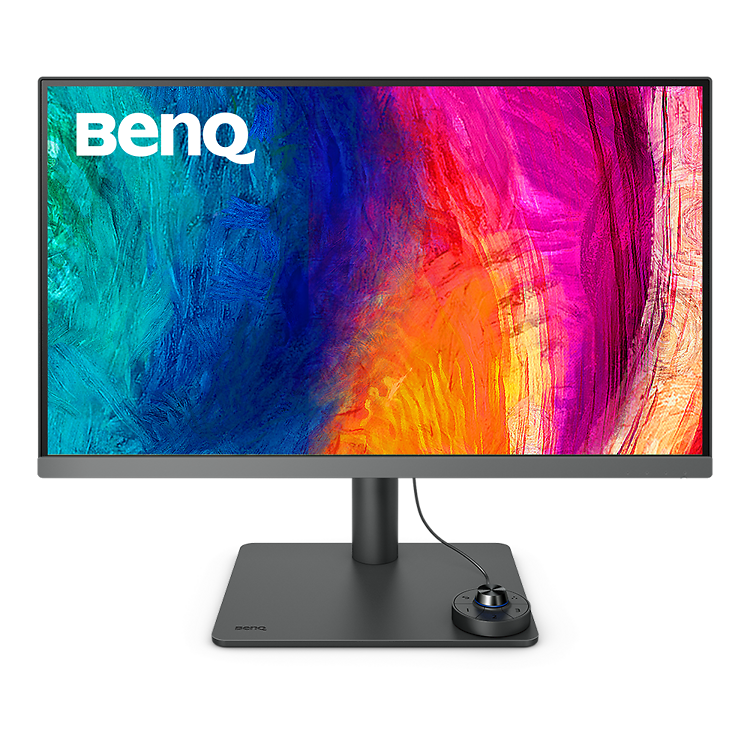
The PD2706U is a 27 inch, 4K, wide-gamut monitor at a very reasonable price.
There is a more stylish and somewhat better model - the PD2725 (still our favourite in the DesignVue range) - and again we have an evaluation of that one:
...but you get quite a lot of the PD2725 features with the PD2706, for a very competitive price. So let's have a look at this new model that is already proving popular.
The PD2706U is very similar to the PD2705U model that came before it.
Other than the new silver (space gray-like) bezel tone, you'd be hard pressed to tell them apart physically.
But there are a few key functional differences, most notably wider gamut and HDR support.Key Features:
New - Wide Gamut - 95% of P3
This new model brings wide gamut to the table, expanding the gamut from traditional sRGB support to coverage of 93% of the modern P3 wide gamut colour space.
Whilst AdobeRGB gamut is yet wider, more print targeted, and available in the BenQ SW Range, Display P3 is the emerging standard for modern wide gamut display devices. P3 support is pretty much standard across the apple range and increasingly we're seeing P3 support beginning to appear across all display devices.
Wider gamut on a monitor like the BenQ PD2706U means theat more saturated colours can be displayed, and displayed accurately.
New - VESA-Certified DisplayHDR 400
The PD2706U also brings VESA-Certified DisplayHDR 400 support as a new feature.
As far as HDR performance goes, it would be fair to describe this as entry level - the peak brightness of 400cd/m2 is a long way off true HDR performance as seen in high end TVs etc. It's not going to compete with a nice OLED obviously.
However this support does definitely improve both the viewing and editing of HDR materials quite significantly - something just not possible of the prior PD2705 model. More on this below.
I evaluated the PD2706U like I do all monitors - by swapping it in place of my primary monitor (currently an Eizo CS2740 at work and and Eizo CG2700X at home). This means I am, in this case, swapping in just about the cheapest, most basic model we range, for the best/most-expensive model.
I then use it, for as much as I effectively can, for at least a week, and try to evaluate as many of the features in practical real-world contexts, as I can. Along the way I assess the monitor in the context of 23+ years of professional monitor use for colour accurate work (being literally the only person in Australia to have extensively used just about every generally available colour accurate monitor made in the last two decades!).
I also try new monitors in dual-monitor mode (i.e. alongside my normal monitor) - and with two computers attached, if that is supported.
I try the monitor both uncalibrated, as it comes out of the box, and calibrated.
In general purpose use, and even before calibrating, the BenQ PD2706U is without doubt an excellent screen. Used for email, browsing, watching videos etc. - it's basically perfect for those sorts of day to day things.
The display is quiet in all respects - no flicker, very sharp, and with a good anti-reflective coating (albeit not up to the level of the SW range).
Packaging - too much foam/plastic came with this unit. Nice that it was well protected, at least. But, BenQ are moving towards more cardboard and less foam - just not yet across all their monitor range clearly.
Ergonomics are excellent - there's plenty of travel in the stand, up and down, and pivot support. The stand - very simple to attach and remove - is simple, secure, and professional looking. Of course the monitor has a VESA mount if you'd prefer to use a monitor arm. The cord management is pretty basic, but works as well as most.
The monitor features low blue light and flicker free (i.e. no PWM) technologies. So it's perfect for folks sensitive to eye & headache issues, and just very comfortable to use for long sessions.
Looks/Design - very nice, simple and professional looking. The silver grey bottom bezel is a good match for modern laptops colours, particularly Macbooks. The darker grey tone of the stand does not match the bottom bezel silver, and I feel it would look ever so slightly nicer if they did match. (Others is the office felt I was being too picky here!).
There is a nice panel include that let's you cover some of the cord jumble at the back. All in all, once in place, it is a slick looking piece of kit.
Controls - like all the recent PD models, BenQ favours looks over utility here a bit - there are no controls, just one LED light, visible from the front. The controls are all behind the monitor, so you reach underneath and push the joystick/buttons that way. It takes a little getting used to and is a bit fiddly, but it definitely makes for a better looking monitor.
The on-screen menus are clear and simple to use, although there's quite a lot of options in there!
KVM- There is also the Hotkey Puck - particularly useful if you're using the monitor as a basic KVM (i.e. you have two computers attached, and want to switch the display and your mouse and keyboard between them). This is a nice setup is you e.g. prefer to keep your serious imaging computer separate from your day to day email machine - I know many of you keep your professional machines off the internet, for example
Speakers - the monitor technically has speakers built in. These are tinny, but fine if all you want are a few low volume OS beeps. Pretty rubbish for any other use - you'll want some external speakers if you care about audio quality at all!
Overall - it's a great desktop monitor for general purpose use that is very easy to like!
It's good to remember I am testing this monitor side by side against some of the finest - and costliest - monitors made for colour accurate work.
The one line summary is that this monitor is ideal - and definitely up to the task of - enthusiast and content creator level work. Perfect if you're e.g. a camera club member looking for a much better than normal monitor for your photography work.
For genuinely colour critical work (professional photography/retouching, fine art print, pro video etc) - you'll want to look at the BenQ SW or Eizo ColorEdge ranges instead.
With the exception of the wider gamut, the PD2706U behaves very similarly to the PD2705U we looked at last year.
Out of the box the colour is good - definitely no major issues, as would be expected with a monitor that offers out of the box deltaE < 3 accuracy, and is Pantone and Calman certified.
Many will be completely happy to pop this out of its box and onto their desk, and use it as is with excellent colour results. They will want to turn the brightness down to something reasonable - like all monitors, out of the box, it's at 100% brightness, far too bright for comfortable desktop use.
Like all of the more affordable colour accurate options, there is a slight coolness to the backlight tint, noticeable in both the whites and the blacks. It is at the level I'd expect for a monitor in this class - good, but definitely noticeable against the warmer, more natural backlight tones of the more expensive monitors.
Native contrast (1200:1) - is very good, but there is of course definitely still some IPS glow visible in the blacks - it's inherent in IPS panels and the price we pay for their overall colour accuracy. (If you're not working in a quite dark room you'll never even be aware of this!)
I calibrated the BenQ PD2706U using a Calibrite Display Plus HL and using Calibrite profiler software. I experimented with various options, but most of my use was calibrated to our typical 5800K whitepoint, Gamma 2.2, and from there I tried both reduced contrast for print work, and full contrast for general editing work.
Post calibration the monitor's colour improves distinctly from the pre-calibrated state.
The native blue tint of the backlight is noticeably lessened in the whites, less so in the blacks, which are still noticeably cool against a reference monitor.
The wider gamut is very noticeable with saturated imagery (I do a lot of bird photography, for example), - and appreciated. Being able to see these colours accurately means I can edit these colours accurately.
Is this monitor as good, once calibrated, as the Eizo ColorEdge I have next to it? Of course not. But it's certainly a lot closer than the price tags indicate. As ever it's the difficult things that the better monitors do better - deep shadow details and neutral greys in particular.
This monitor is clearly not the be all and end all of advanced fine art soft proofing monitors. For example, if you're using the benchmark Epson P906 printer, with precise custom profiles for your papers, and want the ultimate screen to print match - then you'll definitely want to invest in a model higher up, where you will gain a yet wider gamut, and direct hardware calibration support for the best control and accuracy, needed for precise soft-proofing.
But alongside a typical enthusiast printer - like the Epson EcoTank photo models, you can still set up a surprisingly effective modern digital darkroom, with a monitor like this, for a much lower price.
And - more realistically for a monitor like this - for the typical 'content creation' tasks - say on a marketing desk where you're prepping images for web banners or brochures, or you're doing the artwork for your latest podcast, or graphics for your next YouTube masterpiece - the colour performance is excellent and reliable - and, in my experience, you'll find it impossible to find anything else as good or feature-filled at this very reasonable price point.
VESA has this to say about DisplayHDR-400:
VESA-Certified DisplayHDR 400
First genuine entry point for HDR.
Significant step up from SDR baseline:
The BenQ PD2706U can accept and display HDR inputs, something simply not possible with the PD2705U. The input support is for basic HDR10 signals, so no full Dolby Vision here of course (I'm not sure on HLG, and don't have a file to hand, but I can't see it in the specs).
There is a global dimming backlight, and whilst in desktop use the monitor's maximum brightness is ~350 nits, peak brightness (i.e. in small areas of a scene), in HDR mode, can hit 400 cd/m2.
These two features, in a nutshell, in-effect raise the native 1200:1 panel contrast (already pretty good for an LCD!), to more like 5000:1 when displaying HDR. It's a trick, versus a native high contrast panel - but in practise quite an effective trick, and the same one used in many televisions etc. to improve contrast and thus create a more authentic HDR visual, from a relatively humble panel. It's more effective at the highlight end, lending scenes with specular highlights (or e.g. in frame light sources like dancing flames or torches piercing the gloom) - a real sense of dazzle and life. The shadows and dark scenes, though, even with dimming, remain weak and milky by any real HDR standard.
Compared to my benchmark (my Panasonic OLED at home) - it's therefore hard for me to describe the experience as true HDR. But then, compared to just about all other desktop monitors - with most still lacking any HDR support - it's vastly better, for watching (or working on) modern, high quality video - than any 'normal' desktop monitor. Frankly, given it's very accurate colour and decent HDR performance - it's better than most of the populations current TVs according to my quick around the office spot survey!
Once again, BenQ have an obvious winner on their hands with the PD2706U.
They've achieved this by focussing on the core things most people are looking for in a monitor, and delivering some great hardware at a very reasonable price. I don't see anything else in the market offering as much, with as good quality, as the BenQ PD2706U.
By our standards at Image Science, this is a humble monitor. We'll be replacing our PD2705U with this new model, and will use it for preparation of all our marketing materials. The former model has proved excellent for this, and this new model only improves on that.
It's not up to the harder tasks of soft-proofing and Fine Art Print work, sure, so if you're an advanced photographer, then of course look higher up at the SW series.
But if you're a keen amateur, and/or on a tighter budget, there's nothing around this price tag to touch it - it fulfils the brief of 'good, reliable colour, very sharp, all modern inputs and features' that a great many people are looking for in a monitor.
27 inch is the best desktop monitor size, and for general day to day use plus some content creation work, you're getting a whole lot of performance and good design for a highly competitive price.
(As with all monitors, over the long term, to keep it accurate, you will want to add a monitor calibrator).
- Bob H -Thank you for your email. Actually I am a returning customer and a very satisfied customer into the bargain. This time I bought an Epson P800 - originally I bought an Epson 3880 from you and have been very satisfied with it. But having seen the Luminous Landscape videos promoting the P800 I simply had to have one. So I have sold the 3880 and upgraded. It arrived today... you really are efficient - I only ordered it yesterday!
So, thank you for efficient, friendly and excellent service - I teach photography at the local University of the Third age and refer my students to you with every confidence they will be well treated.