Checking What Monitor Profile is Being Used in Photoshop
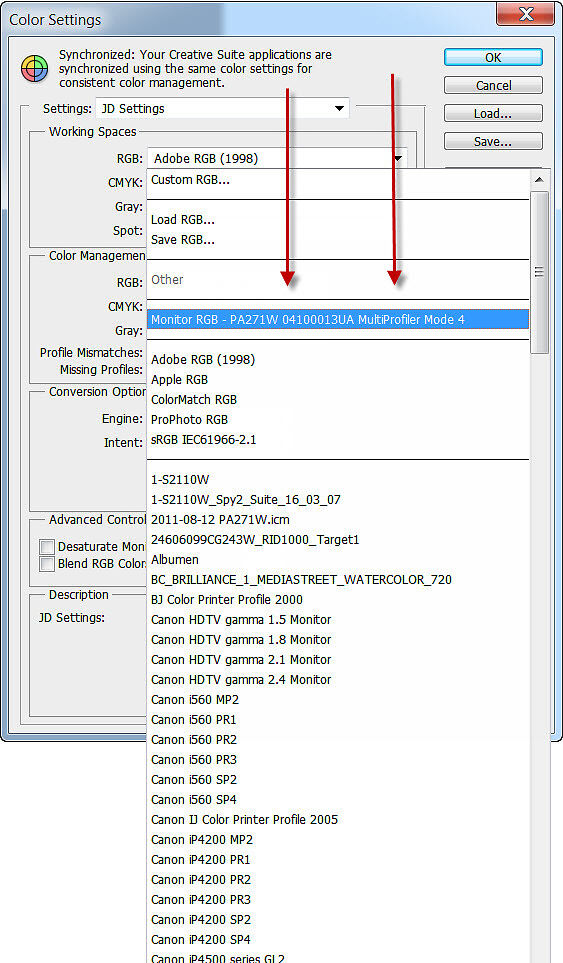
To check what monitor profile Photoshop is using, go to Edit->Colour Settings.
Drop down the RGB working space selector and in there (towards the top) will be an entry 'Monitor RGB - profile name'. N.B. You shouldn't actually need to select this, but this is where you can confirm in Photoshop what profile it is using.
Note: Unfortunately Photoshop only confirms the profile in use for the primary monitor - the one the Photoshop menu bar is on. If you wan to confirm the profile for your other monitor, temporarily make it your primary monitor and re-start Photoshop.
Make sure you leave your correct desired working space selected as you exit this dialogue (for most people this should be AdobeRGB - much more on this in The Digital Fine Print - Colour Management Practise Part Two).